MachineStudio AI

MachineStudio Lens

AI built for epitaxy — ask questions and get answers, directly from your growth data.

Lens is the AI analysis layer for MachineStudio. Connect your preferred LLM — Claude, ChatGPT, or any OpenAI-compatible model — directly to your running MBE system. Ask about temperatures, correlations, distributions, and trends in plain language. Get answers grounded in real instrument data.

L
MachineStudio Lens — GaAs_run_042 claude-sonnet-4
57 tool calls· 841 tokens· $0.0024

It's worth appreciating what this actually is: a production MBE reactor's source-cell temperatures, queryable by any LLM. Point Claude at your OpenAPI spec and pose your question — it will chain these tools autonomously and answer.

This capability doesn't come at the cost of security. Lens is built on a hardened application security architecture designed for environments where live instrumentation and remote AI access must coexist without compromise. Every data channel is protected by 512-bit encryption, ensuring that all process parameters remain unreadable in transit — even across public networks. Access to the API is routed exclusively through a dedicated VPN. Only authenticated, credentialed endpoints can reach your reactor data. All traffic flows through an encrypted tunnel that prevents interception, man-in-the-middle attacks, and packet inspection at the network layer.

The result is a system where the full reasoning power of modern AI — autonomous tool chaining, multi-step inference, real-time anomaly detection — operates directly on live industrial data, without exposing your lab's process secrets to the open internet. Your data stays yours. Lens brings the intelligence to you.

📊

Natural Language Analysis

Ask about any instrument parameter in plain English. Lens fetches the data, calculates statistics, and explains what it sees — mean, standard deviation, range, skewness, and more.

🌡️

Visualization on Demand

Ask for a time series, histogram, correlation plot, or density heatmap. Lens generates publication-quality charts directly from live IDP data, with full control over colors and layout.

🌟

Themes, Your Way

Lens fits your workflow, not the other way around. Choose your own color scheme via a built-in theme editor. Configure every accent, background, and highlight, just the way you like.

💳

Transparent Cost Tracking

Every session shows token usage and cost in real time. Monitor spend by model, API key, and time window. No surprises — you always know what the analysis costs.

In Action

See what Lens can do

Correlations
Distributions
Summary Stats
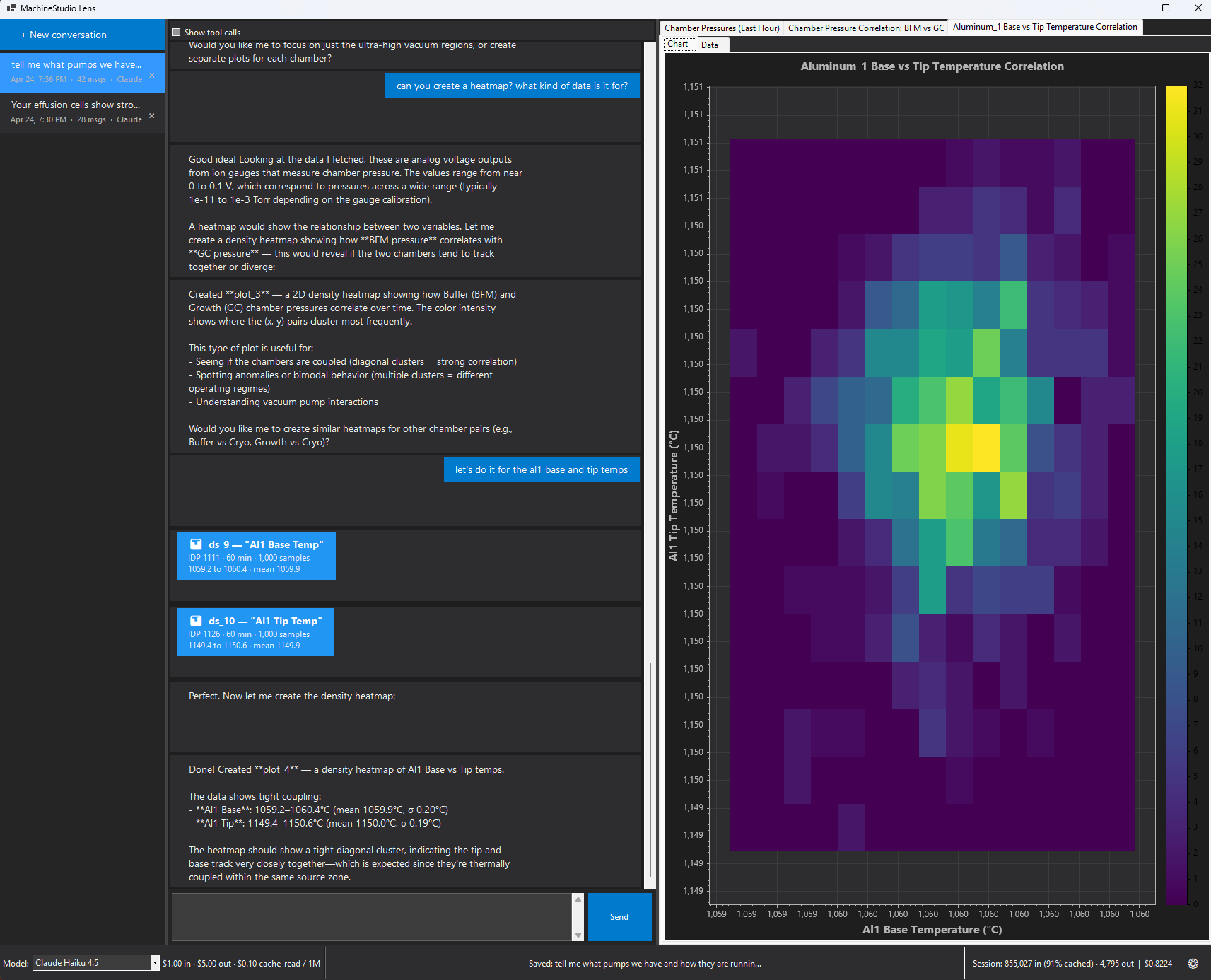
Density heatmap of Al1 base vs tip temperature
Expand

Correlation analysis

Ask Lens to compare any two parameters and it will fetch the data, calculate the Pearson correlation coefficient, and generate a density heatmap showing where values cluster.
Al1 Base vs Tip: tight diagonal cluster confirms thermal coupling
As Cracker vs Bulk: r = 0.05, independently controlled
BFM vs GC pressure: cross-chamber vacuum correlation
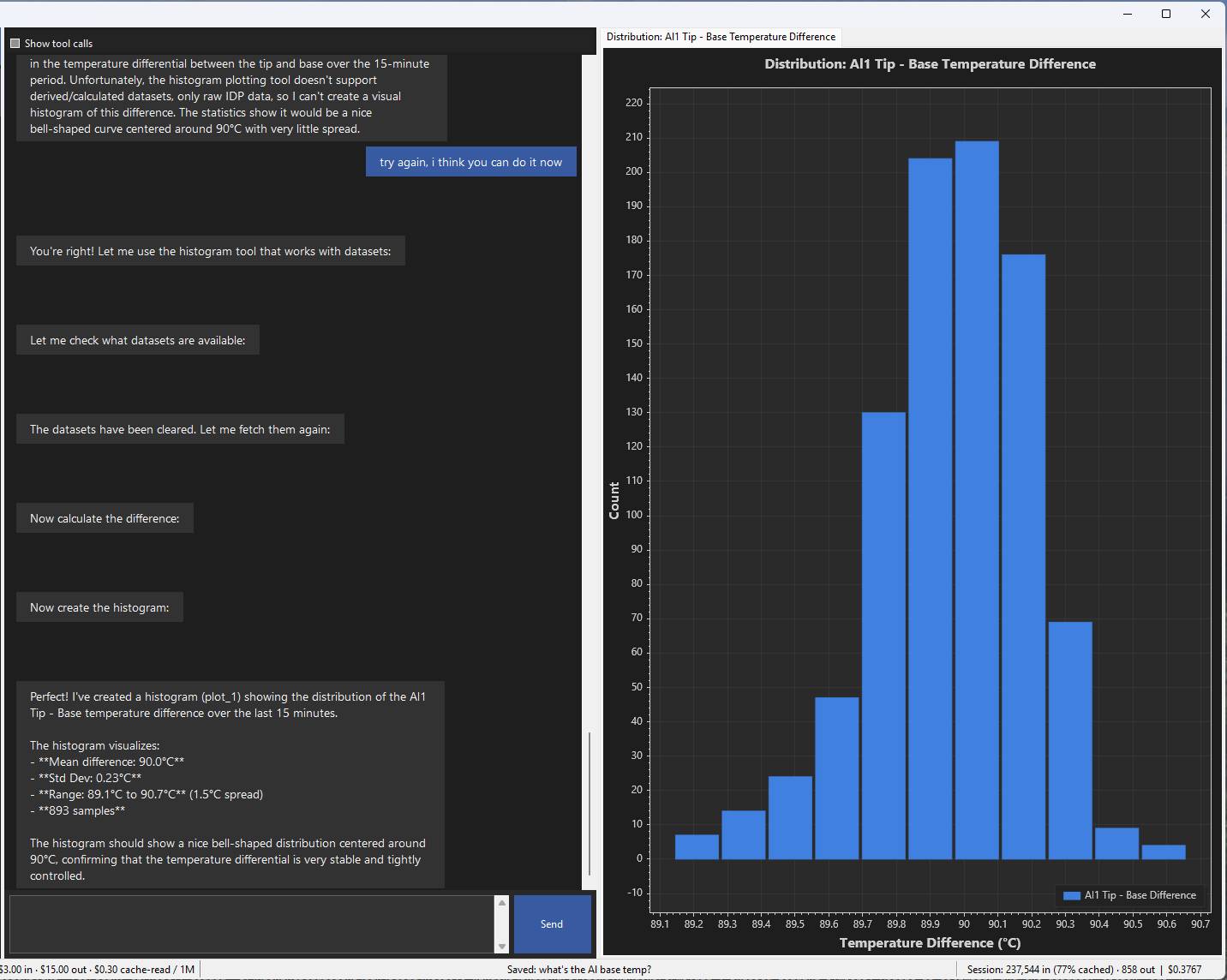
Histogram of Al1 tip minus base temperature difference
Expand

Distribution analysis

Lens can generate histograms of any IDP or derived dataset. Ask for the distribution of a temperature differential, a pressure reading, or any calculated value across a time window.

Al1 Tip − Base: mean 90.0°C, std dev 0.23°C over 893 samples
Bell-shaped distribution confirms tight, stable differential
Configurable bin count, color, and time window
Summary statistics for substrate heater temperature
Expand

Summary statistics

Ask for summary stats on any instrument parameter and Lens returns mean, standard deviation, range, median, quartiles, skewness, and kurtosis — with a plain-language interpretation.

Substrate heater: mean 750.0°C, std dev 0.15°C — very stable
596 readings over the last 10 minutes
Lens explains what the numbers mean for your growth
Under the Hood

Go from instrument to intelligence

MachineStudio exposes a local REST API with a published OpenAPI spec. LLMs that support tool/function calling can discover and chain these endpoints autonomously — no custom integration required.

Discovery & Catalog — 8
TOOLMachineStudio_get_parameters_for_componentList every IDP under a component
TOOLMachineStudio_get_parameters_for_instrumentList every IDP on an instrument
TOOLMachineStudio_list_componentsList active components (logical subsystems)
TOOLMachineStudio_list_instrumentsList active instruments
TOOLMachineStudio_list_machinesList active machines
TOOLMachineStudio_pingHealth-check both databases
TOOLMachineStudio_refresh_catalogReload the catalog from the API
TOOLMachineStudio_search_parametersSearch catalog by parameter name
Telemetry Retrieval — 3
TOOLMachineStudio_get_historyRaw time-series for one IDP
TOOLMachineStudio_get_latest_valueMost recent reading for one IDP
TOOLMachineStudio_get_statsAggregate stats over a window
Workspace Data Management — 7
TOOLdata_delete_datasetRemove a dataset from workspace
TOOLdata_describeSource, time range, sample count, stats
TOOLdata_extend_windowGrow an IDP dataset to a wider window
TOOLdata_fetch_seriesFetch raw time-series into workspace
TOOLdata_fetch_series_sampledFetch downsampled time-series
TOOLdata_list_datasetsList datasets with summaries
TOOLdata_peekSample a few values from a dataset
Math & Derived Datasets — 9
TOOLmath_addPointwise a + b (auto-aligned)
TOOLmath_correlationPearson r between two datasets
TOOLmath_dividePointwise a / b (auto-aligned)
TOOLmath_moving_averageCentered moving average
TOOLmath_moving_stddevCentered moving stddev
TOOLmath_multiplyPointwise a × b (auto-aligned)
TOOLmath_scaleApply y = ys × factor + offset
TOOLmath_subtractPointwise a − b (auto-aligned)
TOOLmath_summaryDescriptive stats (mean/stddev/quartiles/skew)
Operational Records — Runs — 7
TOOLrun_find_relatedFind runs overlapping a time-window
TOOLrun_getFull run detail (header, steps, actions)
TOOLrun_get_activeCurrently-running runs
TOOLrun_get_step_intervalsStep timing for a run
TOOLrun_listList runs with optional filters
TOOLrun_list_statusesLookup table of run_status values
TOOLrun_list_typesLookup table of run_type values
Operational Records — Recipes — 2
TOOLrecipe_getFull recipe definition (steps & setpoints)
TOOLrecipe_listList active recipes with step counts
Operational Records — Runsheets — 3
TOOLrunsheet_getFull runsheet (header, fields, layers)
TOOLrunsheet_listList runsheets with optional filters
TOOLrunsheet_list_templatesList runsheet templates with usage counts
Plot Creation — 6
TOOLplot_create_bar_chartBar chart from categories+values
TOOLplot_create_box_plotBox plot comparing distributions
TOOLplot_create_density_heatmap2D density heatmap (color = frequency)
TOOLplot_create_histogramHistogram of a dataset's values
TOOLplot_create_line_plotLine plot from one or more datasets
TOOLplot_create_scatter_correlationScatter X vs Y aligned on time
Plot Modification — 10
TOOLplot_add_right_y_axisAdd a series to the right y-axis
TOOLplot_add_series_to_plotAdd a dataset as a new series
TOOLplot_clear_overlaysRemove all run overlays from a plot
TOOLplot_close_plotClose a plot and remove its tab
TOOLplot_overlay_runOverlay run-step bands on a line plot
TOOLplot_remove_seriesRemove one series from a plot
TOOLplot_set_gridShow or hide gridlines
TOOLplot_set_legend_positionMove the legend position
TOOLplot_update_plotUpdate title, axes, y range, style
TOOLplot_update_seriesUpdate series label/color/style
Plot Inspection & Export — 2
TOOLplot_export_pngSave a plot as PNG (default 1200×800)
TOOLplot_list_plotsList open plots with their series
Security

Your data stays yours

The MachineStudio API runs locally on your network. Your instrument data never leaves your facility unless you choose to expose it. Lens is designed to work within your existing security posture.

API key authentication

Every request requires a valid X-API-Key header. Keys are configured locally in appsettings.json and never transmitted to EpiWare or any third party.

Local by default

The API binds to your local network by default. Cloud LLM access requires you to explicitly expose the endpoint — typically via a Cloudflare Tunnel or VPN. No exposure without intent.

VPN & tunnel support

For teams that want cloud LLM access, we support Cloudflare Tunnel and standard VPN configurations. Your IT team controls access; the API endpoint is the only surface exposed.

Get Started

Ready to talk to your machine?

Lens requires an active MachineStudio installation and internet connectivity for cloud LLM access. Contact us to learn more.

Get in touch →